Browser build: cherry-pick a commit
Note
This is an optional, advanced operation. It only works if you build with a fork (Browser build steps 1–4). AAPS Builder repositories do not include this workflow.
Use this only when a developer asks you to test a specific change (they give you one or more commit hashes) before it is in a released version.
Before you start
Sync your fork: this workflow builds the current state of your branch, not a version you pick from a list.
Google Drive must be authorized (Step 3): the built app is saved there, like a normal build.
Run the workflow
In your GitHub fork of AndroidAPS, open Actions.
Expand All workflows and select Cherry Pick CI (Pre-release Feature Backport).
Tap Run workflow and fill in:
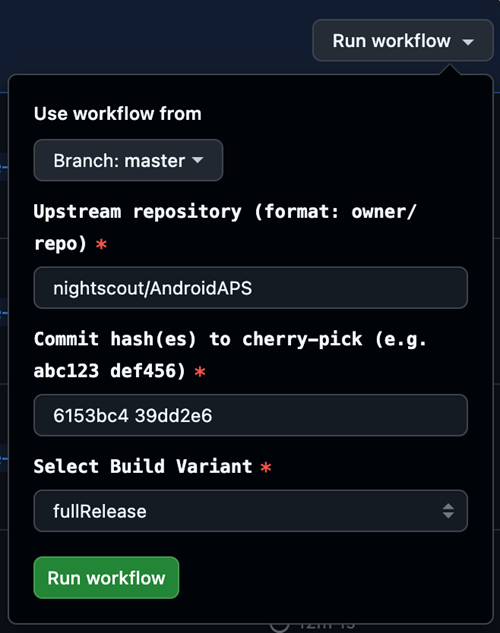
Use workflow from: the branch to add the commits to, normally
master.Upstream repository: where the commits come from. Keep
nightscout/AndroidAPSunless the developer told you otherwise.Commit hash(es) to cherry-pick: the hash(es) you were given, separated by spaces.
Select Build Variant: see variants (normally
fullRelease).
Tap Run workflow. When it completes, the app is in your Google Drive, as after a normal build.