Extended carbs / “eCarbs”
What are eCarbs and when are they useful?
With a regular pump therapy, extended boluses are a good way to deal with fatty or otherwise slowly-absorbed meals which increase blood glucose longer than the insulin is in effect. In a loop context, however, extended boluses don’t make as much sense (and pose technical difficulties), since they’re basically a fixed high temporary basal rate, which goes against how the loop works, which is adjusting the basal rate dynamically. For details see extended bolus below.
The need to deal with such meals still exists though. Which is why AAPS supports so called extended carbs or eCarbs.
eCarbs are carbs that are split up over several hours. For standard meals with more carbohydrates than fat/protein, entering the carbs up front (and reducing the initial bolus if needed) is usually sufficient to prevent too-early insulin delivery. But for slower-absorbing meals where full carb entry up front results in too much IOB from SMB, eCarbs can be used to more accurately simulate how the carbs (and any carb equivalents you enter for other macronutrients) are absorbed and influence the blood glucose. With this information, the loop can administer SMBs more gradually to deal with those carbs, which can be seen as a dynamic extended bolus (this should also work without SMBs, but is probably less effective).
Note: eCarbs aren’t limited to fatty / protein heavy meals: they can also be used to help in any situation where there are influences that increase the blood sugar, e.g. other medication like corticosteroids.
Mechanics of using eCarbs
To enter eCarbs, open the Carbs dialog (Treatments → Carbs), enter the total carbs, set a Duration, and optionally shift the start with Carb time (numbers below are just examples, you will need to try your own values to arrive at satisfactory glucose response for your use-cases):

The eCarbs on the main screen: the number in brackets in the COB field shows the carbs still to come, and the COB graph shows each future eCarbs entry as an orange marker. If you don’t see a COB graph, add one with Add graph below the graphs (see AAPS screens).

Carbs type in the Bolus wizard: bread, cake or pizza
In the Bolus wizard, three buttons below the Carbs field let you choose how fast your meal is absorbed. Pick one before you confirm. Depending on the type, AAPS takes a part of the carbs you typed as normal carbs, and adds extended carbs (“eCarbs”) later for slow, rich meals. Press the (i) icon next to the buttons to see the typical foods for the selected type and what it does to your carbs.
Type |
Typical foods (examples from the app) |
Carbs now, used for the bolus |
eCarbs added |
|---|---|---|---|
Bread (default) |
Bread, savory pastries, yogurt, fruit, potatoes, rice, oatmeal, vegetables |
100 % |
None |
Cake |
Dumplings, pasta, Asian dishes rich in carbs and fats, sweet and yeast pastries, cereals, honey, jam |
90 % |
20 %, starting 60 minutes later, spread over 2 hours |
Pizza |
Lasagna, pizza, hamburgers, fries, baked potatoes, chips |
80 % |
35 %, starting 60 minutes later, spread over 3 hours |
Example: you type 100 g and choose Pizza. The bolus is calculated for 80 g, recorded now. 35 g of eCarbs start 1 hour later and are spread over 3 hours.
Good to know:
This is not a simple split: with Cake and Pizza, the carbs recorded add up to more than you typed (110 % and 115 %). The extra is only in the eCarbs.
The bolus only covers the carbs taken now. AAPS does not bolus up front for the eCarbs: the loop takes them into account once they start, like any other eCarbs.
If you set a Carb time, the eCarbs start 60 minutes after that time.
The confirmation dialog shows the eCarbs on their own line, e.g. “eCarbs 35g / 3h (+60min)”.
Grams are rounded down to whole numbers.
The percentages, delays and durations are fixed; they can’t be changed in the settings.
The choice is not remembered: the wizard opens on Bread every time.
A way to handle fat and protein with that feature is described here: https://adriansloop.blogspot.com/2018/04/page-margin-0.html
Recommended setup, example scenario, and important notes
The recommended setup is to use the OpenAPS SMB APS plugin, with SMBs enabled as well as the Enable SMB with COB preference being enabled.
A scenario e.g. for a Pizza might be to give a (partial) bolus up front via the Bolus wizard and then use the Carbs dialog to enter the remaining carbs for a duration of 4-6 hours, starting after 1 or 2 hours.
For a quicker start, the Bolus wizard can add eCarbs for you: choose the carbs type Cake or Pizza below the Carbs field (see above). The amounts and timing are fixed, so use the Carbs dialog instead if you want other values.
Important notes: You’ll need to try out and see which concrete values work for you of course. You might also carefully adjust the setting max minutes of basal to limit SMB to to make the algorithm more or less aggressive. With low carb, high fat/protein meals it may be enough to only use eCarbs without manual boluses (see the blog post above). When eCarbs are generated, a Careportal note is also created to document all inputs, to make it easier to iterate and improve inputs.
Extended boluses and why they don’t work in a closed-loop environment
As mentioned above extended or multiwave boluses do not really work in a closed loop environment. See below for details
Extended bolus and switch to open loop - Dana and Insight pump only
Some people were asking for an option to use extended bolus in AAPS anyway as they wanted to treat special foods the way they are used to.
That’s why AAPS offers an extended bolus for users of Dana and Insight pumps: open Manage and select Extended Bolus.
AAPS first warns you that the closed loop will be stopped while the extended bolus runs. Tap OK to continue:

Enter the Insulin amount and the Duration, then tap the confirm button at the bottom and OK:
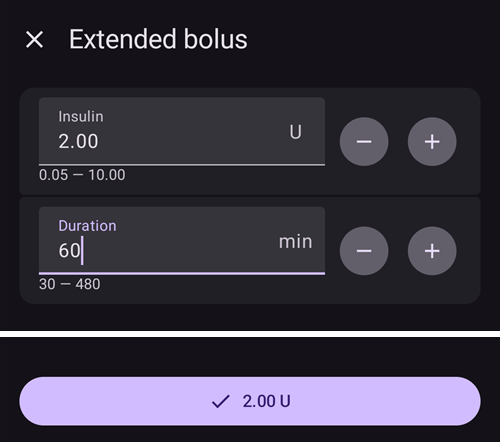
On the Insight pump, the extended bolus is not available if TBR emulation is used.
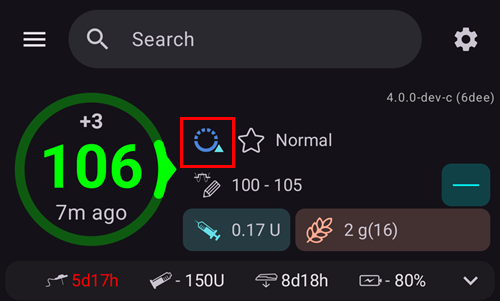
While the extended bolus is running, the loop runs in Open Loop mode (the loop icon on the main screen changes), and closed loop is switched on again automatically when the extended bolus ends:
The Manage menu shows a Cancel button with the rate and the elapsed / total time (for example Cancel 2.00 U/h 1/60’). Tap it to stop the extended bolus early:
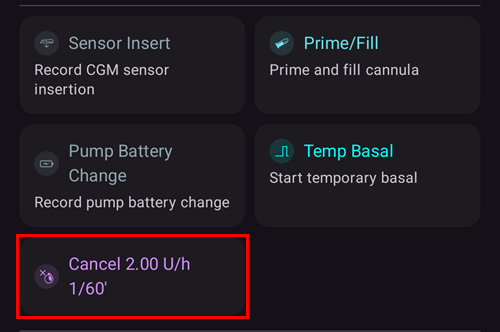
Why extended boluses won’t work in a closed loop environment
The loop determines that now 1.55U/h is to be delivered. Whether this is delivered as an extended bolus or TBR does not matter to the algorithm. In fact, some of the pumps use the extended bolus. What should happen then? Most pump drivers then stop the extended bolus -> You didn’t even need to start it.
If you had the extended bolus as input, what should happen in the model?
Should it be considered neutral together with the BR and looped on it? Then the loop should also be able to reduce the bolus if, for example, you get too low and all the “neutral” insulin is taken away?
Should the extended bolus simply be added? So the loop should simply be allowed to continue? Even in the worst hypo? I don’t think this is so good: A hypo is foreseen but it must not be prevented?
The IOB that the extended bolus builds up materializes after 5 minutes at the next run. Accordingly, the loop would give less basal. So not much changes… except that the possibility of hypo avoidance is taken.