COB calculation
How does AAPS calculate the COB value?
When carbs are entered by the user as part of a meal entry or carb correction, AAPS will add this calculation to the current carbs on board (COB). AAPS then calculates the user’s carbs’ absorption based on observed deviations to the user’s BG values. The rate of absorption depends on the carb’s sensitivity factor (CSF). This is not a feature within the user’s Profile but is calculated by AAPS according to ISF/I:C setup, and is determined by how many mg/dL 1 g of carbs will raise the user’s BG.
Carb Sensitivity Factor
The formula adopted by AAPS is:
absorbed_carbs = deviation * ic / isf.
The effect on the user’s Profile will:
increase IC - by increasing the carbs absorbed every 5 minutes thus shorten total time of absorption;
increase ISF - by decreasing the carbs absorbed every 5 minutes thus prolong total time of absorption; and
change Profile Percentage - increase/decrease both values thus has no impact on carbs absorption time.
For example, if the user’s Profile ISF is 100 and the I:C is 5, the user’s Carb Sensitivity Factor would be 20. For every 20 mg/dL the user’s BG goes up, 1 g of carbs will be calculated as absorbed by AAPS. Positive IOB also affects the COB calculation. So, if AAPS predicts the user’s BG to go down by 20 mg/dL because of IOB and it instead stayed flat, AAPS would also calculate 1 g of carbs as absorbed.
Carbs will also be absorbed via the methods described below based on which sensitivity algorithm has been selected within the user’s AAPS.
Carbs Sensitivity - Oref1
Unabsorbed carbs are cut off after specified time:


Older screenshot
The screenshot above is from an earlier AAPS version — in AAPS 4 the graphs look slightly different, but the COB graph carries the same information.
Carbs Sensitivity - WeightedAverage
Absorption is calculated to have COB = 0 after specified time:

If minimal carbs absorption (min_5m_carbimpact) is used instead of value calculated from BG deviations, an orange dot appears on the COB graph.
Detection of wrong COB values
AAPS will warn the user if they are about to bolus with COB from a previous meal if the algorithm detects current COB calculation as incorrect. In this case it will give the user an additional hint on the confirmation screen after usage of bolus wizard.
How does AAPS detect wrong COB values?
Ordinarily AAPS detects carb absorption through BG deviations. In case the user has entered carbs but AAPS cannot detect their estimated absorption through BG deviations, it will use the min_5m_carbimpact method to calculate the absorption instead (so called ‘fallback’). As this method calculates only the minimal carb absorption without considering BG deviations, it might lead to incorrect COB values.

In the screenshot above, 66% of time the carb absorption was calculated by the min_5m_carbimpact instead of the value detected from deviations. This indicates that the user may have had less COB than calculated by the algorithm.
How to deal with this warning?
Consider cancelling the treatment - press ‘Cancel’ instead of OK.
Calculate your upcoming meal again with bolus wizard leaving COB unticked.
If you need a correction bolus, enter it manually.
Be careful not to overdose or stack insulin!
Why does the algorithm not detect COB correctly?
This could be because:
Potentially the user overestimated carbs when entering them.
Activity / exercise after your previous meal.
I:C needs adjustment.
Value for min_5m_carbimpact is wrong (recommended is 8 with SMB, 3 with AMA).
Manual correction of carbs entered
If carbs are over or underestimated this can be corrected through the Treatments history screen as described here.
Carb correction - how to delete a Carb entry from Treatments
The Treatments history screen can be used to correct a faulty carb entry by deleting it. This may be because the user over or underestimated the carb entry:
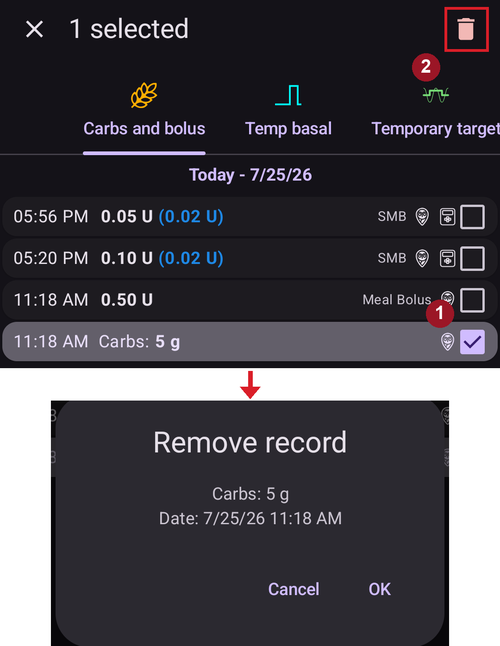
Check and remember actual COB and IOB on the AAPS main screen.
Open Treatments history (drawer menu → Treatments history), tab Carbs and bolus. Depending on the pump, the carbs might show together with insulin in one line or as a separate entry (e.g. with Dana RS).
Long-press the faulty carb entry — the list switches to selection mode with a checkbox on every line, and the entry is ticked (marked 1 above). Tick any further entries you want to remove as well.
Tap the 🗑 Delete icon in the top bar (marked 2) and confirm — the confirmation dialog lists exactly what will be removed.
Make sure carbs are removed successfully by checking COB on the AAPS main screen again.
Do the same for IOB if there is just one line including carbs and insulin.
If carbs are not removed as intended and additional carbs are added as explained in this section, the COB entry will be too high and this could lead to AAPS delivering too much insulin.
Enter the correct carbs amount through the Carbs dialog (Treatments → Carbs) and set the correct event time.
If there was just one line including carbs and insulin the user should also re-add the amount of insulin. Make sure to set the correct event time and check IOB on the main screen after confirming the new entry.